Best Golf Net for Simulator Setups: Top Enclosures for Home Practice
Answering your search for a reliable golf net for simulator use, this guide highlights five top-enclosure options that balance safety, durability, and projection compatibility. These picks suit different spaces and budgets—from compact home garages to larger basements. The top buyers are: weekend golfers seeking year-round practice, homeowners installing a dedicated simulator bay, and beginners wanting safer, rebound-controlled nets. Below is a quick comparison table to help you decide at a glance.
| Product | Best For | Key Benefit |
|---|---|---|
| RAYZESTTOP 11x8ft Enclosure | All-skill levels | Blank simulator screen and target cloth included |
| ZivPlay 10x8ft Cage | Home practice with safety nets | Corner foam padding for rebound control |
| GoSports Range Cage 10×8 | Full swing practice | Impact screen included, sturdy build |
| IDEATRY 3-in-1 Studio | All-in-one training | Thick screen and 270° protection |
| ZEALFEEL 10x8ft Cage | Indoor/Outdoor versatility | Dual-layer HD simulator screen option |
RAYZESTTOP Golf Net Enclosure With Blank Screen

The RAYZESTTOP enclosure is designed for golfers of all abilities, with an 11’ x 8’ x 5.1’ footprint that fits a range of practice spaces. It ships with a blank simulator screen (88×88 inches) and target cloths to help guide short-game work. The carbon-steel base and fiberglass poles create a stable frame, while the durable polyester mesh handles a wide swing speed spectrum.
Best for: players who want a ready-made, projector-ready practice area with a simple setup. The included screen makes it suitable for entry-level simulator use. Choose this if you value quick assembly and a portable enclosure.
Caution: The setup relies on a suitable room height and projection alignment; ensure the ceiling clearance and projector distance meet your simulator requirements.
ZivPlay Golf Simulator Enclosure, 10×8 ft

The ZivPlay enclosure delivers a complete home practice system with an 10’7″ width by 8′ height by 5′ depth cage and a 4:3 impact screen. It includes two side shank nets and corner foam padding to minimize bounce-back and protect walls and people during high-speed shots. The design emphasizes safety and compatibility with most projectors and simulators when paired with the right mat and monitor.
Best for: homeowners who want strong safety nets and wall protection in a dedicated garage or large room. It’s a solid choice if you plan to practice in a family environment where ball rebound control matters.
Caution: The full simulator setup (projector and hitting mat) is not included; you’ll need to source those separately for a complete system.
GoSports Range Cage With Impact Screen

The GoSports Range Cage provides an enclosed 10×8 footprint with a high-density impact screen designed for home simulator setups. The system is built to handle repeated high-speed impacts and includes foam-padded base components to reduce rebound. While the launch monitor and projector are not included, the cage is optimized for use with most standard home sim setups.
Best for: players seeking a sturdy, all-in-one practice cage that emphasizes long-term durability and ease of use in a typical garage or basement. Consider this if you value a dedicated hitting cage that minimizes ball chase time.
Caution: Avoid this if your space cannot accommodate the full 10×8 footprint or if you require a built-in projector mount in the enclosure.
IDEATRY Golf Simulator Enclosure With Net & Target
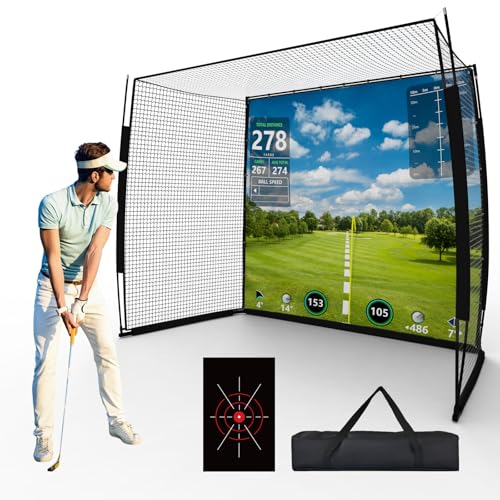
The IDEATRY setup positions itself as a versatile, all-in-one training space with a premium impact screen, thickened HD net, and a 270° coverage. The 6-ply high-density net is designed to dampen ball speeds up to 250 mph, while the 270° wrap keeps shots contained. The product emphasizes ease of setup for garages, basements, or outdoor spaces and is praised for its balance of durability and flexibility.
Best for: players who want a comprehensive training environment that supports various drill types, including long-drive practice, short-game work, and precise projection. Choose this if you want a broader training system in a single package.
Caution: Projector or mounting gear is not included; ensure your space supports a 270° enclosure and screen tensioning needs.
ZEALFEEL Golf Simulator Cage With Dual-Layer Screen

The ZEALFEEL cage measures 10×8 ft with a dual-layer HD simulator screen option that helps deliver clearer visuals and improved projection compatibility. The design prioritizes resilience with a 16mm fiberglass pole framework and steel base, complemented by side barriers and ball-return features for uninterrupted practice. The dual-layer screen reduces bounce and noise while maximizing image quality for simulators.
Best for: players who want a flexible indoor/outdoor setup that can pair with or without the HD screen, depending on projector specs. This option is ideal if you anticipate switching between pure net practice and full-screen simulator sessions.
Caution: If you rely on the included screen, verify projector throw and screen size compatibility with your specific simulator software and room dimensions.
Buying Guide
What should you consider when selecting a golf simulator enclosure?
- Space and footprint: Measure room width, height, and depth to ensure the enclosure fits with room to swing and projectors placed at the recommended distances.
- Screen and projection: Decide between a blank screen, HD impact screen, or dual-layer HD screen based on your projector and simulator needs. Consider noise dampening and image clarity.
- Rebound management: Look for foam padding, reinforced frames, and rebound-reducing bases to protect walls and bystanders during high-speed shots.
- Durability and materials: Prioritize steel frames, fiberglass poles, and high-density nets for long-lasting performance under frequent practice.
- Projector compatibility: Check whether the enclosure includes mounting options or requires separate hardware for projector alignment and distance.
- Safety: Ensure side nets, corner protections, and ball-return systems keep your space safe for others and pets.
- Setup and maintenance: Favor systems with simpler assembly and easier net tensioning, and consider whether you want portable or semi-permanent installations.
Practical questions buyers often ask
- Do these enclosures include a projector mount? Some do; others require separate components.
- Is the accuracy of projection affected by room size? Yes—projection alignment and throw distance must match the screen size and enclosure dimensions.
- Can I use these outdoors? Many are designed for indoor use, but some models tolerate outdoor settings with weather considerations.
- Is the ball-return system reliable? Most enclosures feature built-in or optional return systems to minimize ball pickup time.
- Are the nets capable of handling powerful drives? High-quality nets and reinforced frames are designed for frequent high-speed shots; verify net ply and materials.
- What is the typical setup time? Most models assemble within minutes to a few hours, depending on complexity and space.
FAQ
- What size enclosure should I choose for a 9-foot ceiling? Consider at least 8-9 feet of vertical clearance for your swing and the enclosure height; a taller enclosure helps accommodate drivers with longer follow-throughs.
- Is a projector essential for practice? No, you can use a basic screen and practice without projection, though most buyers pursue projection for realistic simulator experiences.
- Can I install multiple nets in a single space? It’s generally designed for one enclosure; combining nets requires careful spacing and may affect rebound control.
- What maintenance is required? Regular inspection of nets, frame joints, and padding helps maintain stability and safety over time.
- How does a dual-layer screen improve visuals? The dual layer reduces bounce, absorbs impact, and provides a stable surface for projector images.