Best Impact Screens for Golf Simulators
The Best Impact Screens For Golf Simulators guide helps buyers choose durable, projection-ready screens for indoor practice. This article highlights five top options and explains who each is best for. If you want a high-durability screen for garage or home use, or a screen designed to reduce noise while maintaining image clarity, you’ll find practical recommendations here. The included buying guide answers common questions like which size to choose, how many grommets you need, and what to expect from installation.
| Product | Size / Fit | Best For |
|---|---|---|
| Aikeec Golf Simulator Impact Screen – 10 ft x 10 ft | 10 ft x 10 ft; 7 mm thick; 32-54 grommets | Durable, high-velocity practice; indoor or outdoor use |
| Aikeec Golf Simulator Impact Screen – 10 ft x 8.5 ft | 10 ft x 8.5 ft; 5 mm thick; 32-46 grommets | Quiet impact; home setups with projectors |
| GoSports Golf Simulator Impact Screen | Size varies; projector-ready backing | Projector-based setups with universal mounting |
| IDEATRY Golf Simulator Impact Screen Enclosure | 10×8 ft enclosure; 6-ply HD screen | All-in-one enclosure with nets and padding |
| Durbles Golf Simulator Impact Screen | Triple-layer screen; durable construction | Heavy-use environments; quiet practice |
Aikeec Golf Simulator Impact Screen — 10 ft x 10 ft

This 10 ft by 10 ft impact screen uses a thick 7 mm polyester blend designed for durability. It is tested for ball speeds up to 200 mph and claims long life with over 100,000 strikes. The dense weave resists stains, aiding long-term use in home or garage setups. Best for buyers needing a robust, all-weather option that can handle frequent use and occasional outdoor practice.
Best for: home and garage setups that demand high durability and large projection areas. The screen’s weight and reinforced perimeter support stable installation even with heavy ball impact.
Limitation: The product data emphasizes durability and multiple installation options but mentions repeated identical installation notes, suggesting you should confirm exact grommet counts before purchase.
Aikeec Ultra Clear Screen — 10 ft x 8.5 ft

This model uses high-quality Flannel material to deliver long-lasting durability with a crystal-clear image surface. The screen is designed for indoor golf training with any simulator system, and its HD surface helps golfers spot details in their swing. It’s a good pick for home setups prioritizing image clarity and compatibility with multiple simulators.
Best for: players seeking a clear projection surface that works with various simulator ecosystems and emphasizes long-term wear resistance.
Limitation: The description does not specify the exact projection size or frame details, so verify compatibility with your projector and stand setup before buying.
Aikeec Golf Simulator Impact Screen — 7mm Thickened Edge, 10 ft x 8.5 ft
This screen uses a 5 mm thick polyester core with a reinforced 7 mm edge to deliver stability and reduce noise on impact. It supports balls moving at 110–200 mph and withstands up to 100,000 hits. Installation is flexible with 32–46 grommets to adapt to your mounting setup. Best for: quieter, more stable practice sessions in home spaces where sound containment matters.
Limitation: The balance of grommet counts may require careful planning to achieve the desired softness of ball impact and tension.
GoSports Golf Simulator Impact Screen

The GoSports option is a projector-ready screen designed to pair with the GoSports ELITE hitting net. It uses a high-density woven polyester to form a durable backdrop that can handle real golf balls. This choice is ideal for shoppers who already use a GoSports system or want a universal mounting setup with simple corner attachment.
Best for: buyers who want a universal mounting solution and a straightforward setup for projector-based simulators.
Limitation: Not all screen sizes are listed in the short product description, so confirm compatibility with your exact simulator dimensions before purchasing.
IDEATRY Golf Simulator Enclosure With Net & Target
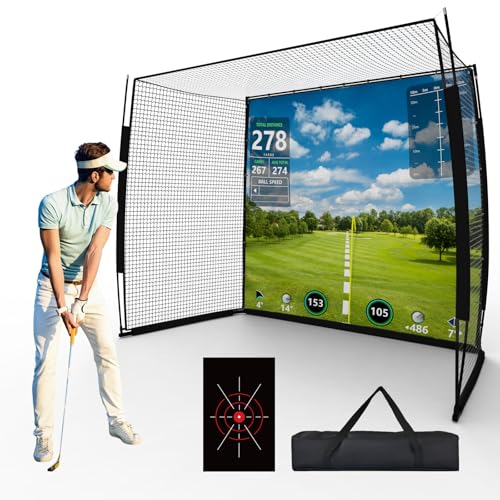
This 10×8 ft enclosure combines a thick HD impact screen with a precision target sheet and a pro practice net. The setup includes corner nets and corner padding to reduce rebound, enhancing safety in indoor spaces. It is suitable for garages and basements where space is controlled and you want a complete practice system without separate components.
Best for: buyers seeking an all-in-one enclosure with nets, padding, and a dedicated target area for precise practice drills.
Limitation: This is a larger, integrated system; ensure your space accommodates a full enclosure and the projector alignment requirements.
Durbles Golf Simulator Impact Screen

This triple-layer design combines an HD outer layer, an ultra-sound damping middle layer, and an impact-resistant inner layer for durability and quieter practice—even in busy households. It is built to withstand thousands of ball impacts and provide stable, reliable performance in home or commercial settings.
Best for: environments needing quiet operation and robust performance in frequent-use setups.
Limitation: The product description emphasizes durability and layering but provides limited details about exact dimensions or grommet counts; verify fit before purchase.
Buying Guide: Key Purchase Considerations
What screen size should I choose? Consider your projector throw distance and the size of your hitting mat. A larger screen (like 10 ft by 10 ft) offers more projection space but needs more room and stronger mounting. For smaller rooms, 8–9 ft wide screens can still deliver immersive visuals with proper projector positioning.
How many grommets do I need? More grommets allow tighter tension and reduced sag, but require more attachment points. If you plan to use bungee cords or carabiners, aim for screens offering at least 32–46 grommets for flexible mounting options.
Is noise reduction important? If you practice in a quiet home environment, look for screens with reinforced edges and multi-layer construction designed to dampen impact sounds.
What about durability and ball speed? Screens that claim 110–200 mph range and 100,000+ strikes tend to be the best long-term value for frequent practice or small commercial use. Check material thickness and edge reinforcement for stability.
Projection Compatibility
Confirm that your projector’s brightness, throw distance, and screen size align with the screen’s reflective properties. Non-glare, high-definition surfaces help maintain image fidelity for swing analysis.
Installation and space considerations
Enclosures with integrated nets are convenient but require more space. Open screens offer flexibility but demand careful mounting. Measure room height, width, and depth to ensure safe, unobstructed use and safe ball rebound containment.
FAQ
- What is a good screen size for a home golf setup? A size that fits your room and projector throw distance. Common choices are 8×10 ft or 10×10 ft for spacious setups, with 8×8 ft suitable for tighter spaces.
- How many grommets should a screen have? Look for 32–46 grommets as a flexible guideline to achieve balanced tension and stable mounting.
- Do impact screens affect image quality? Yes, surface quality and material affect clarity. Screens labeled for HD or crystal-clear imaging typically preserve detail essential for swing analysis.
- Are enclosure systems worth it for beginners? Enclosures with nets and padding reduce rebound and protect surroundings, making them safer for households with children or pets.
- Can I use any screen with any golf simulator? Many screens are designed to be universal, but always verify compatibility with your projector, net system, and simulator software.
- Which feature matters most for acoustics? Multi-layer constructions and edge reinforcement help dampen impact noise, which is beneficial in quiet rooms.