Best Tablet Stands for Treadmills: Hands-Free Viewing During Workouts
Finding a secure, easy-to-use tablet stand for treadmill workouts can boost motivation and comfort. This guide highlights five top options that fit most treadmills and suit different needs, from slim acrylic stands to heavy-duty floor mounts. Best for runners, walkers, and gym enthusiasts who want to stream workouts, view workouts dashboards, or read while exercising. Each pick is evaluated for stability, compatibility, and ease of use, helping you choose the right stand for your routine.
| Product | Best For | Why It Stands Out | Limitations |
|---|---|---|---|
| Qsxou Treadmill Tablet Holder (B0DXQDCWDN) | Most treadmills with a console | Clear acrylic, lightweight yet strong; easily hangs onto most machines | Clear material may show smudges |
| CreaDream Aluminium Tablet Mount Clamp | Heavy tablets on bikes and treadmills | Ultra-secure aluminum clamp; wide angle range | Requires positioning on handlebars |
| OHLPRO Tablet Mic Stand Holder | Peloton and gym setups with bars | Multi-functional clamp; 360° adjustment; stable | Clamp compatibility varies by bar size |
| MAGIPEA Gooseneck Holder | Bed, sofa, or couch workouts | Flexible gooseneck and 360° rotation; strong base | Base weight may be light on very large tablets |
| BluuSuuk Tablet Floor Stand | Over-bed and recliner use | Double-weight base; extended arm for tall viewing | May be bulky for small spaces |
Qsxou Treadmill Tablet Holder

Best for: treadmill users who want a clear, unobtrusive view of their console while reading or watching. This acrylic stand keeps devices or reading materials in place without blocking the dashboard, making it easier to track pace and metrics during workouts.
- Clear View Holder: Lets you see the treadmill dashboard while holding your tablet, magazines, or books.
- Versatile & Convenient: Easily hangs onto most treadmills and fitness machines with a console.
- Strong & Lightweight: Acrylic construction provides durability without bulk.
Caution: Acrylic material may show fingerprints and smudges with regular use. Best for lighter tablets or magazines to minimize wobble.
Tablet Floor Stand With 5LB Base
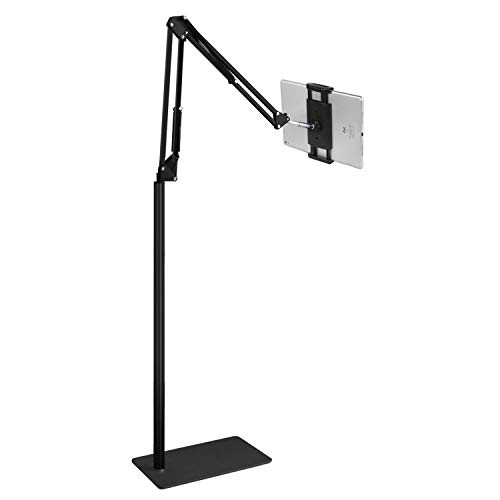
Best for: people who want a flexible, floor-based stand that can be placed near a bed or couch for hands-free entertainment or practice sessions.
- Wide Compatibility: Works with 4.7-11″ devices under 1.5 lb, suitable for many tablets and phablets.
- Free Your Hands: Ideal for reading, streaming, or practice sessions while seated or reclining.
- Easy to Install: Tool-free setup for quick use at home, in bed, or on the couch.
Limitation: Heavier tablets may require added weight to the base for stability on soft surfaces.
BluuSuuk Tablet Floor Stand
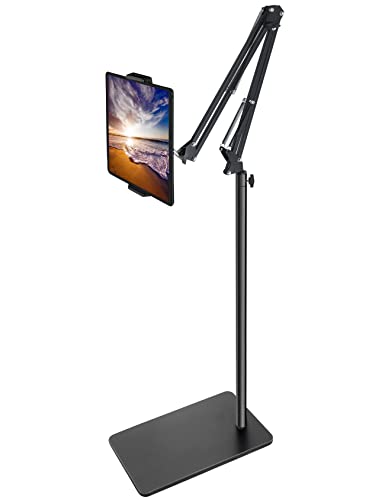
Best for: users who prefer a tall, flexible viewing position while lying down, sitting, or standing during workouts.
- Double Weight Base: Improves stability for overhead or bed-mounted viewing.
- Flexible Arm: Extends and tilts for a comfortable angle in various positions.
- Reliable Construction: Predominantly steel components for durability.
Limitation: May require more space and careful placement in smaller rooms.
CreaDream Aluminium Tablet Mount Clamp

Best for: fitness equipment with handlebars or bars, including spin bikes and treadmills, that require a secure clamp mount.
- Ultra Secure & Stable: Aluminum alloy construction for durability and stability.
- Multi-Angle Adjustable: 180-degree arms and 360-degree ball joint provide flexible viewing angles.
- Wide Application: Clamps onto handlebars with diameters from 0.63″ to 1.77″.
Limitation: Clamp positioning is best on handlebars or bars; not ideal for all flat surfaces.
OHLPRO Tablet Mic Stand Holder

Best for: gym environments requiring dual-use clamps, such as treadmill handlebars and mic stands, for a studio-like setup during workouts.
- Multi-Functional Clamp: Fits tubes 0.5″–1.57″ and flat surfaces, compatible with a range of equipment.
- Easy Installation: Tool-free setup with soft silicone pads to protect devices and reduce shake.
- 360° Adjustable Viewing: Ball-head design allows portrait/landscape and tilt adjustments.
Limitation: Compatibility varies with bar diameter; confirm your equipment fits the clamp before purchase.
Buying Guide: Key Considerations for Choosing a Treadmill Tablet Stand
Purpose and placement: Determine whether you want a stand that attaches to the treadmill console, clamps to handlebars, or sits on the floor. If you frequently switch between devices or use a couch or bed, floor stands or flexible goosenecks may be preferable.
Device compatibility and weight: Check the supported tablet size and weight. Some stands support a wide range (4.7–13 inches), while others favor lighter devices or e-readers.
Stability vs. portability: Acrylic and lightweight stands are easy to move but may wobble with larger tablets. Heavier bases and steel components improve stability for vigorous workouts.
Adjustability: Look for multi-angle and rotation options to switch between portrait and landscape modes, as well as tilt adjustments for glare reduction.
Durability and protection: Consider materials (acrylic, aluminum, steel) and whether soft pads protect devices from scratches during movement.
Installation: Tool-free clamps and simple mounting steps save time and reduce setup friction during workouts.
Space and aesthetics: If you have a compact workout area, choose a slim, unobtrusive model. If you prefer a bold look, a robust, metal-based stand might suit you better.
Frequently Asked Questions
- What is the best type of stand for a treadmill with a strong console?
Answer: A slim acrylic or console-hung holder that does not obstruct the display is ideal for maintaining dashboard visibility. - Can these stands hold large tablets safely?
Answer: Many models support up to 11″ to 13″ tablets; verify weight limits and arm strength for heavier devices. - Do I need tools to install these stands?
Answer: Several models are tool-free, but some clamps may require basic tools for secure mounting. - Are gooseneck stands stable on soft surfaces like a bed?
Answer: Gooseneck and weighted-base designs improve stability, but placement on a hard surface is generally more secure. - Which stand is best for hands-free reading while walking?
Answer: Floor stands with a long reach or bed/sofa-mounted options are best for hands-free viewing while seated or reclined. - Can I use these stands for devices other than tablets?
Answer: Yes, many holders accommodate e-readers, Kindle, magazines, or phones within their supported size range.